
你的视觉小说,
就在你手上Your visual novels,
on your terms
从导入第一部作品,到存档、备份与日常管理。按步骤认识 iPhone 与 iPad 上的 VNPlayer。From your first import to saves, backups, and everyday library care. A practical guide to VNPlayer on iPhone and iPad.
1.30 使用指南 · Build 61 · 更新于 2026.09.22Guide for 1.30 · Build 61 · Updated 2026.09.22
导入你的作品Import your first title
VNPlayer 不内置、提供或分发第三方游戏。请准备你有合法使用权的完整游戏文件。VNPlayer does not bundle, provide, or distribute third-party games. Prepare a complete copy of content you have the right to use.
准备完整文件Keep the complete folder
推荐保留原目录结构,将整个游戏文件夹打包成 .zip。也可导入已解压文件夹;不要只选一个脚本、EXE 或素材包。Keep the original folder structure and zip the whole game folder. An extracted folder also works; a lone script, EXE, or resource archive is not a complete game.
保存到「文件」Save it in Files
用 AirDrop、数据线、iCloud 云盘或其他文件 App 传到设备。云端文件请先下载完成,确保在「文件」App 中可以访问。Transfer via AirDrop, cable, iCloud Drive, or another file app. Download cloud files fully so they are available in the Files app.
点「+」导入Tap + to import
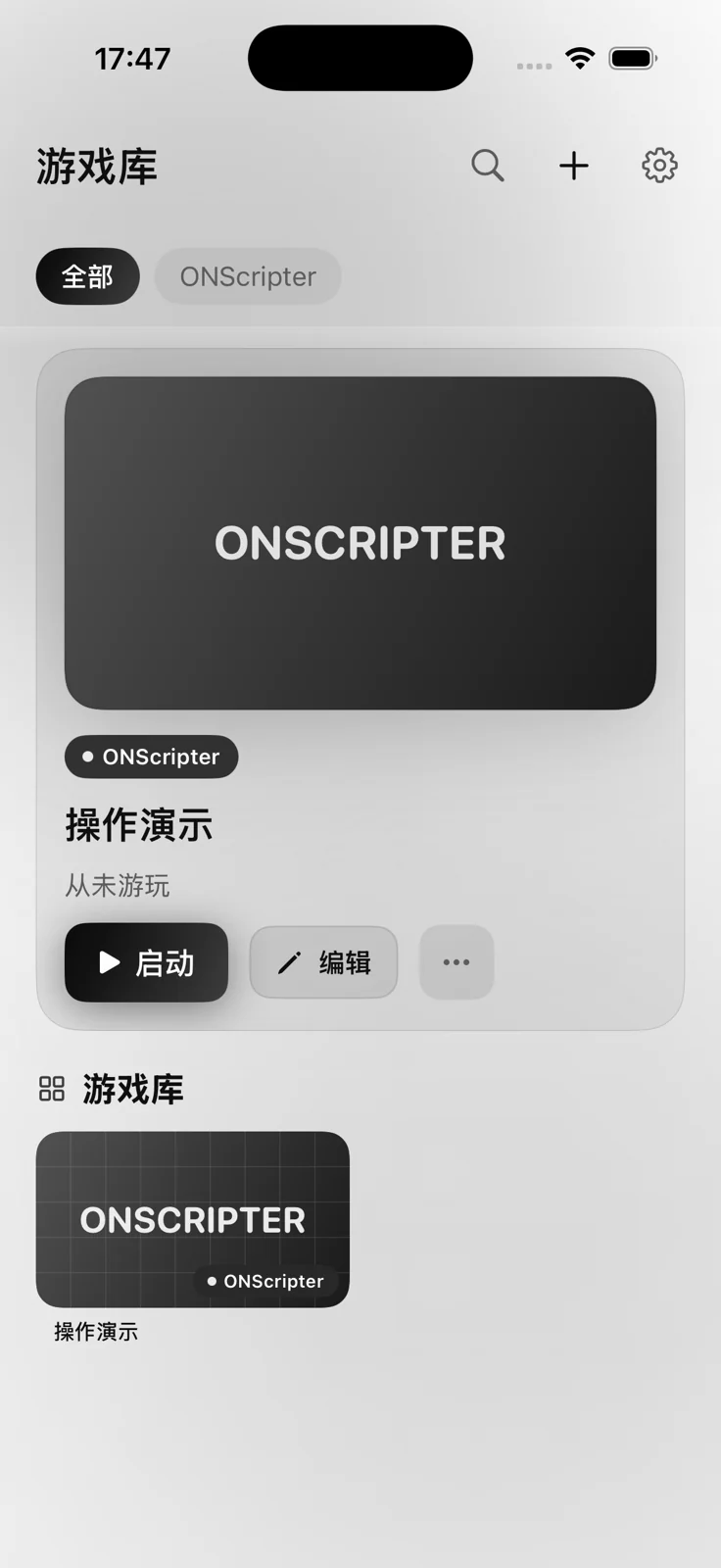
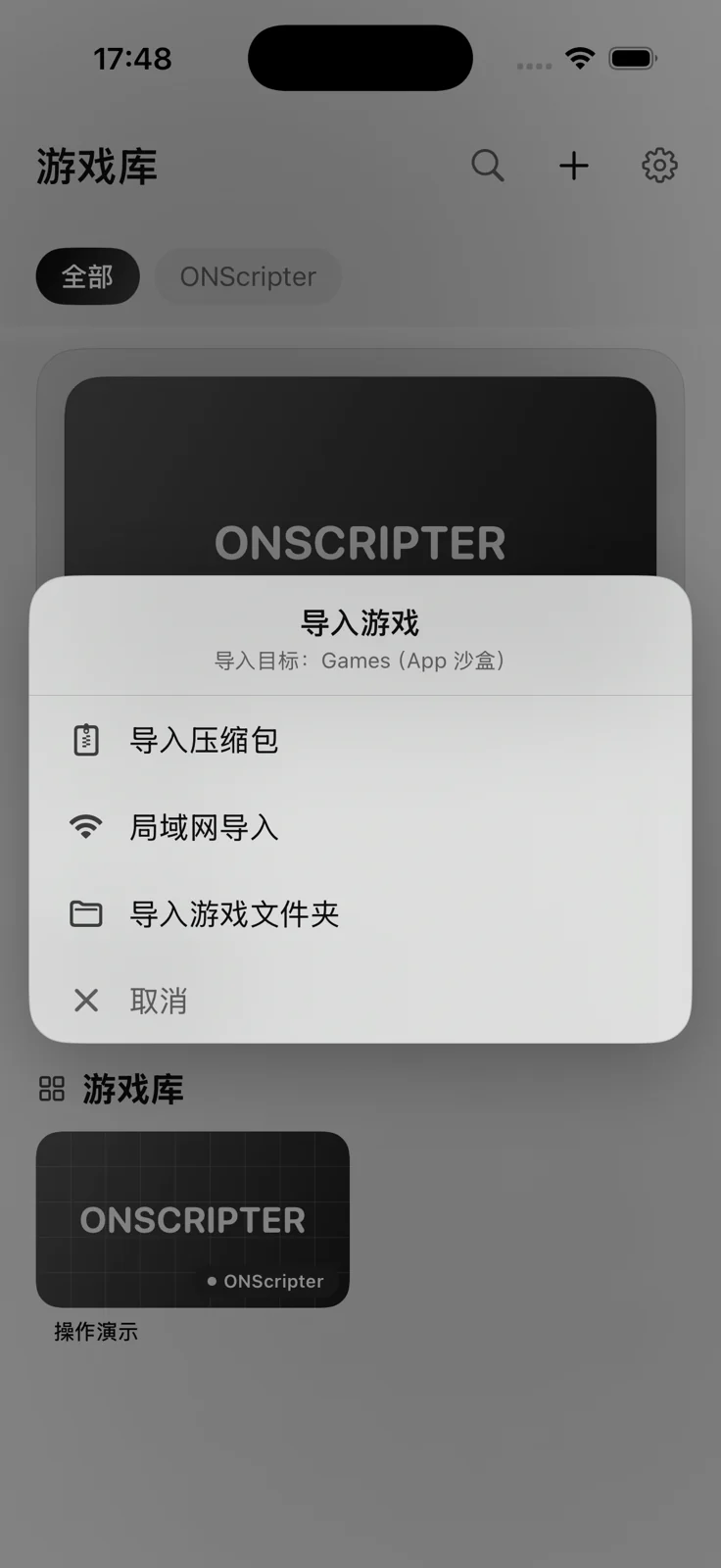
打开游戏库,点右上角「+」→「导入压缩包」,选择文件;已解压内容请选择「导入游戏文件夹」。首次空库也有直接导入按钮。In the library, tap + → Import Archive and select your file. For extracted content, choose Import Game Folder. An empty library also offers direct import buttons.
等识别完成,再启动Wait for import, then launch
有密码时按提示输入;等待解压、扫描结束,选择出现的卡片并点「启动」。引擎会自动识别,Ren’Py 使用固定的内置运行时。Enter an archive password if prompted. Wait for extraction and scanning, select the new card, and tap Launch. Engine detection is automatic; Ren’Py uses the bundled runtime.
选择适合你的传输方式Choose a transfer method
局域网快传Local network transfer
让电脑或另一部手机与本机连接同一 Wi-Fi。游戏库「+」→「局域网导入」,保持此页面打开;在另一台设备的浏览器输入页面显示的完整地址(包含端口和路径),或扫描二维码。选择压缩包上传,接收完成后回到 VNPlayer 点「导入此游戏」。Connect both devices to the same Wi-Fi. Tap + → Local Network Import and keep the page open. On the sending device, open the full displayed address, including its port and path, or scan the QR code. Upload the archive; when received, tap Import This Game in VNPlayer.
从其他 App 共享Share from another app
在「文件」或支持分享的 App 中选中文件,点「共享」→「VNPlayer」或「用 VNPlayer 打开」。如果列表里没有它,先存入「文件」,再从 VNPlayer 的导入菜单选择。Select a file in Files or a sharing-capable app, then Share → VNPlayer or Open in VNPlayer. If it is absent from the list, save the file to Files and use VNPlayer’s import menu.
手动放入 GamesCopy into Games
在「文件」→「我的 iPhone / iPad」→「VNPlayer」→Games 中放入完整游戏文件夹,然后返回 APP 刷新游戏库。每部作品单独一个文件夹,保留原有文件名及目录结构。Copy each complete game folder into Files → On My iPhone/iPad → VNPlayer → Games, then refresh the library. Keep each title in its own folder and preserve filenames and folder structure.
引擎与格式Engines & formats
导入成功表示文件已放入游戏库,不代表每个作品都兼容。具体支持取决于脚本、资源、插件和原作版本。A successful import puts files in the library; it does not guarantee compatibility. Scripts, resources, plugins, and the original engine version all matter.
读取 KiriKiri / KAG 系列内容。特定 Windows 插件、专有加密或 DRM 可能无法支持;遇到乱码可单独设置文本编码。Runs KiriKiri / KAG content. Some Windows plugins, proprietary encryption, and DRM are unsupported. Per-game text encoding is available.
当前固定内置 Ren’Py 8.5.3,不提供 7.x / 8.x 版本切换。旧 Python 2 脚本、额外原生扩展和不兼容 API 可能无法运行。Currently bundles Ren’Py 8.5.3 with no 7.x/8.x runtime selector. Older Python 2 scripts, extra native extensions, and incompatible APIs may fail.
读取 NScripter / ONScripter 系列脚本与资源。请保留作品配套字体、音频和封包;支持程度取决于实际用到的指令。Reads NScripter / ONScripter scripts and resources. Keep bundled fonts, audio, and archives; support depends on the commands used.
整理你的游戏库Organize your library
查找、收藏与切换作品Find, favorite, and select
使用顶部搜索按名称查找,按引擎标签筛选。选中作品后查看「最近游玩」与累计时间;点击「启动」进入游戏。Search by title or filter with engine tabs. Select a title to see its recent use and accumulated play time, then tap Launch.
名称与封面Names and covers
长按游戏卡片可打开管理菜单,进行重命名、收藏和设置封面。首页选中作品的「编辑」及「…」也提供对应操作;设置封面时选择你有权使用的图片。Long-press a game card for Rename, Favorite, and Set Cover. The selected title’s Edit and … controls also expose management actions. Use an image you have permission to use.
启动文件与 KR 编码Startup files and KR encoding
正常启动请保留自动识别。识别不正确时,长按卡片→「选择启动文件」,选择作品实际入口。KR 乱码可用「文本编码」选择 GBK、Shift-JIS、UTF 系列或混合编码,改后退出并重新启动该作品。Leave startup detection on Automatic when it works. Otherwise, long-press → Select Startup File and select the actual entry. For garbled KR text, use Text Encoding to choose GBK, Shift-JIS, UTF, or mixed encoding, then restart that title.
删除前先备份Back up before deleting
长按卡片→「删除」后会显示确认。确认将删除该作品的游戏文件夹,文件夹内的存档也会受到影响,不能当作只隐藏卡片。先导出备份并保存到 APP 之外。Long-press → Delete shows a confirmation. Confirming removes the game folder, affecting saves stored inside it; it is not a hide-card action. Export a backup outside the app first.
开始阅读,记得存档Read, save, and resume
游戏画面采用横屏;游戏库和设置支持竖屏及横屏。游戏自己的菜单文字、槽位和可用操作可能不同。Games run in landscape; the library and settings support portrait and landscape. Menu labels, save slots, and available actions vary by title.
继续对话与打开菜单Advance text and open controls
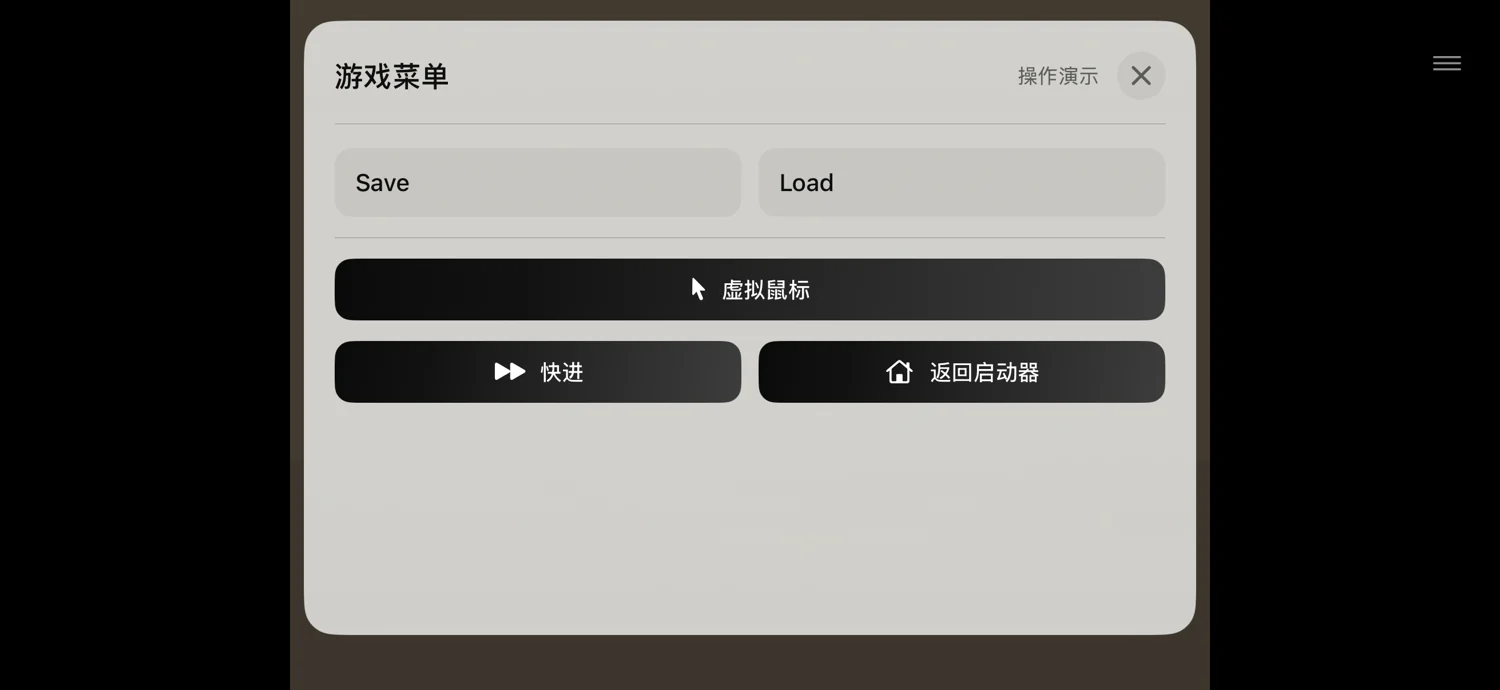
轻触游戏画面推进对话,点击分支选项作出选择。点游戏右上角的菜单入口打开控制面板;需要离开时先在游戏内存档,再用「返回启动器」或「退出游戏」。Tap the game view to advance dialogue and tap a choice to select it. Open controls from the upper-right menu. Before leaving, save in the game and use Return to Launcher or Exit Game.
ONS 存档 / 读档ONS save / load
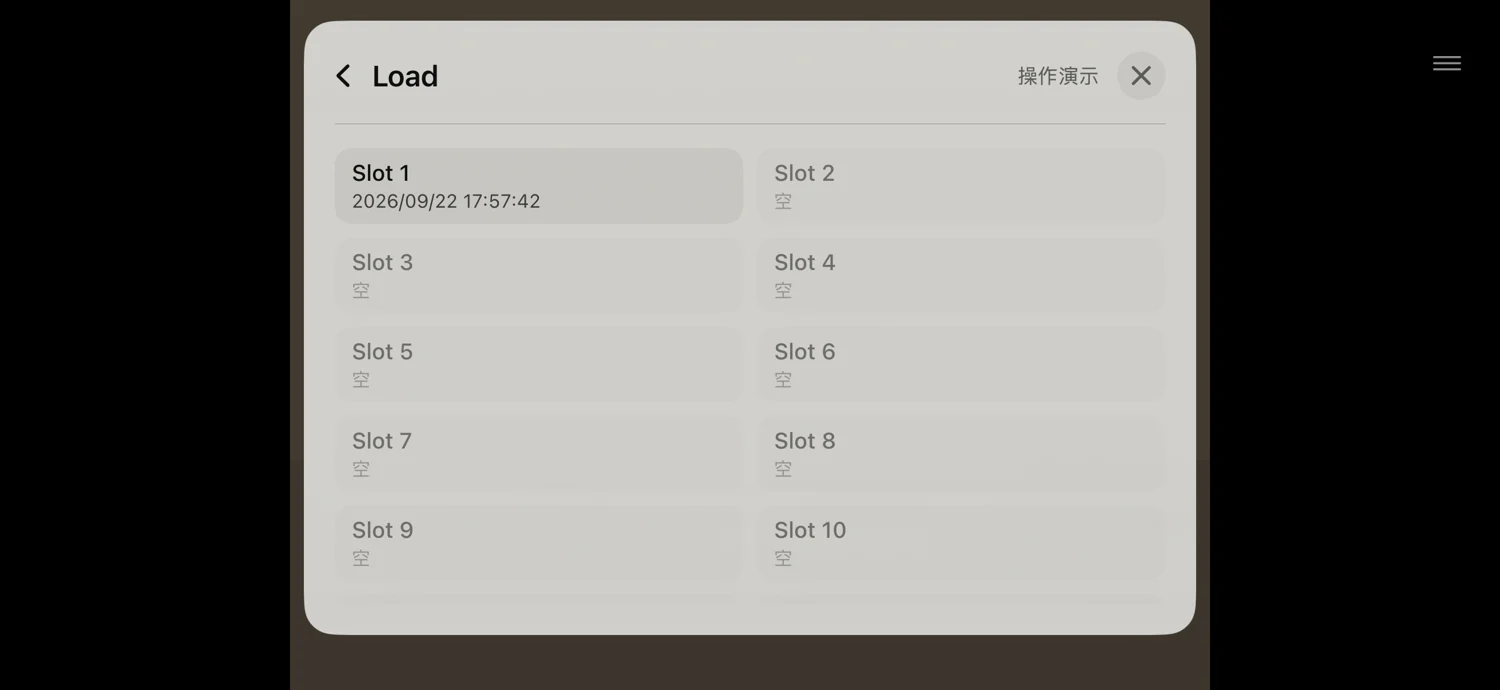
打开右上角菜单,选作品提供的「存档 / Save」,再选择槽位;看到保存成功提示再离开。「读取 / Load」使用对应槽位。新版写入的存档会保留当前等待中的对话或分支状态;旧版存档缺失的信息不能补回。Open the upper-right menu, choose the title’s Save action, then a slot. Wait for a success notice before leaving. Use Load and the corresponding slot to resume. Newly written saves retain the pending dialogue or choice; missing state in older saves cannot be reconstructed.
KR / Ren’Py 存读档KR / Ren’Py saves
使用游戏自身的存档与读取界面。KR 控制面板的存读档快捷入口依赖作品提供的菜单;不可用时打开游戏内菜单。Ren’Py 可从「游戏内菜单」进入原作存读档页。库页面的「备份」不能代替游戏内存档。Use the game’s own Save and Load screens. KR shortcuts depend on the title exposing the relevant menu; otherwise open its in-game menu. In Ren’Py, choose In-game Menu for the title’s save/load screen. Library backups do not replace saving in-game.
虚拟鼠标与键盘Virtual mouse and keyboard
按钮太小或作品依赖鼠标时,在游戏控制面板开启「虚拟鼠标」,单指滑动移动指针,轻点为左键,长按后移动可拖拽,双指轻点为右键,双指滑动为滚动;点「关闭」退出该模式。需要输入名字等文字时使用作品输入框及控制面板提供的键盘入口。Enable Virtual Mouse from game controls for small targets or mouse-dependent interfaces. Slide one finger to move, tap to left-click, hold and move to drag, tap with two fingers to right-click, and slide two fingers to scroll. Tap Close to leave this mode. For names and text, use the game’s input field and the keyboard control where available.
把进度留在自己手里Keep a copy of your progress
更新、换机、删除作品或卸载 APP 前,先把备份保存到 APP 之外,并确认文件已复制完成。Before updating, moving devices, deleting a title, or uninstalling, save a backup outside the app and confirm the copy has completed.
全量备份Back up all data
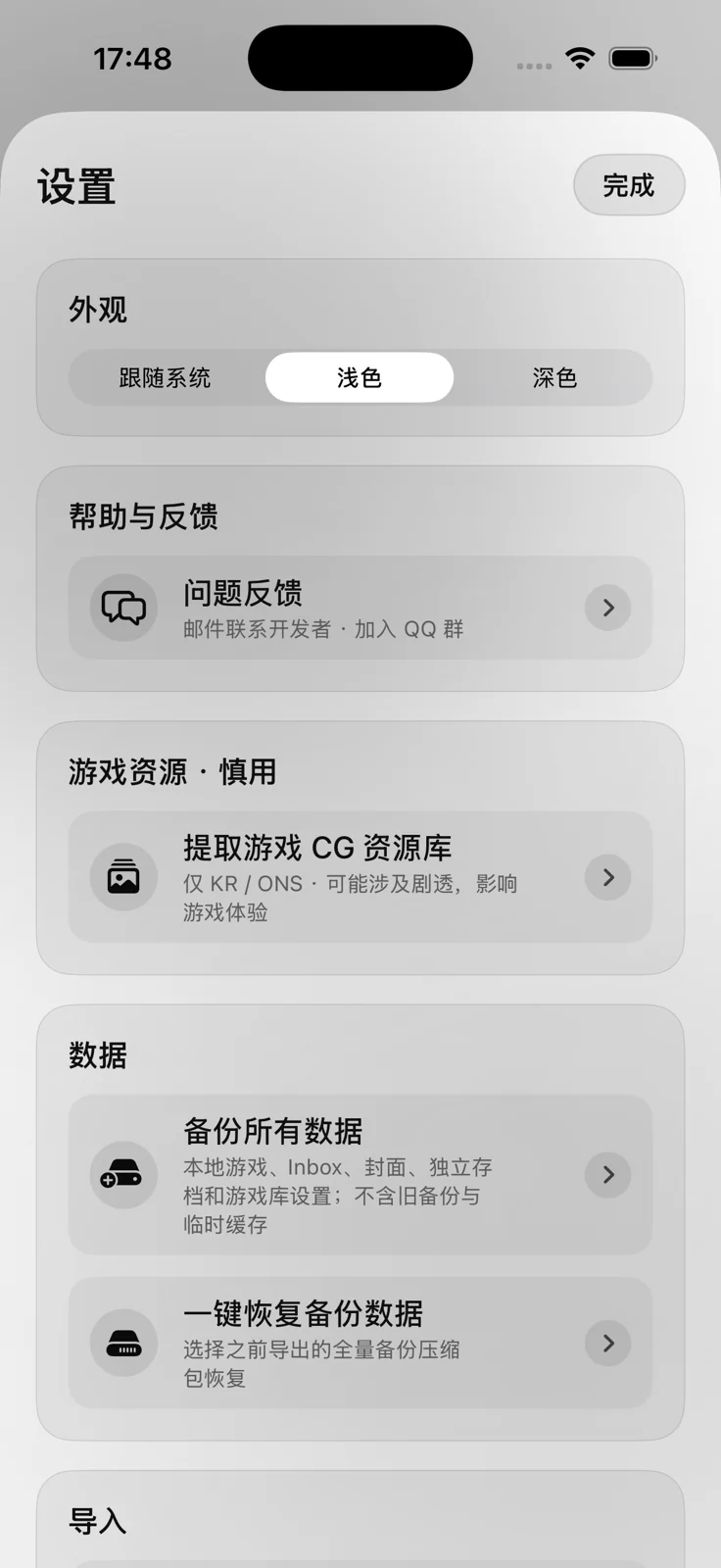
先在游戏内存档并退出到游戏库。打开「设置 → 备份所有数据」,等待打包完成,在系统分享面板选择「存储到文件」,保存到 iCloud 云盘、电脑或其他外部位置。备份包含本地游戏、Inbox、封面、独立存档和游戏库设置,不包含旧备份与临时缓存。Save in-game and return to the library. Open Settings → Back Up All Data, wait for packaging, then choose Save to Files in the share sheet and store it in iCloud Drive, on a computer, or elsewhere outside the app. It includes local games, Inbox, covers, separate saves, and library settings; old backups and transient caches are excluded.
合并恢复Restore by merging
打开「设置 → 一键恢复备份数据」,选择全量备份 ZIP,阅读确认后开始。恢复会先校验,再补入缺少的文件;同路径文件及已有游戏设置保留本机版本。因此它不会自动用旧备份覆盖本机同名存档。Open Settings → Restore Backup Data, select the full-backup ZIP, and review the confirmation. After validation, missing files are added; existing files at the same path and existing game settings remain. An older backup therefore does not automatically overwrite a same-name local save.
单个作品备份Back up one title
选中作品,打开「…」→「备份」。它打包该作品目录;对应「恢复」会覆盖该目录的同名文件,与全量合并恢复不同。换机和保护独立存档时优先使用全量备份;外部目录另行复制保管。Select a title and use … → Backup to archive its folder. The corresponding Restore overwrites same-name files in that folder, unlike a full merge restore. Prefer a full backup for migration and separate saves; copy any external folders separately.
资源库与空间管理Resources & storage
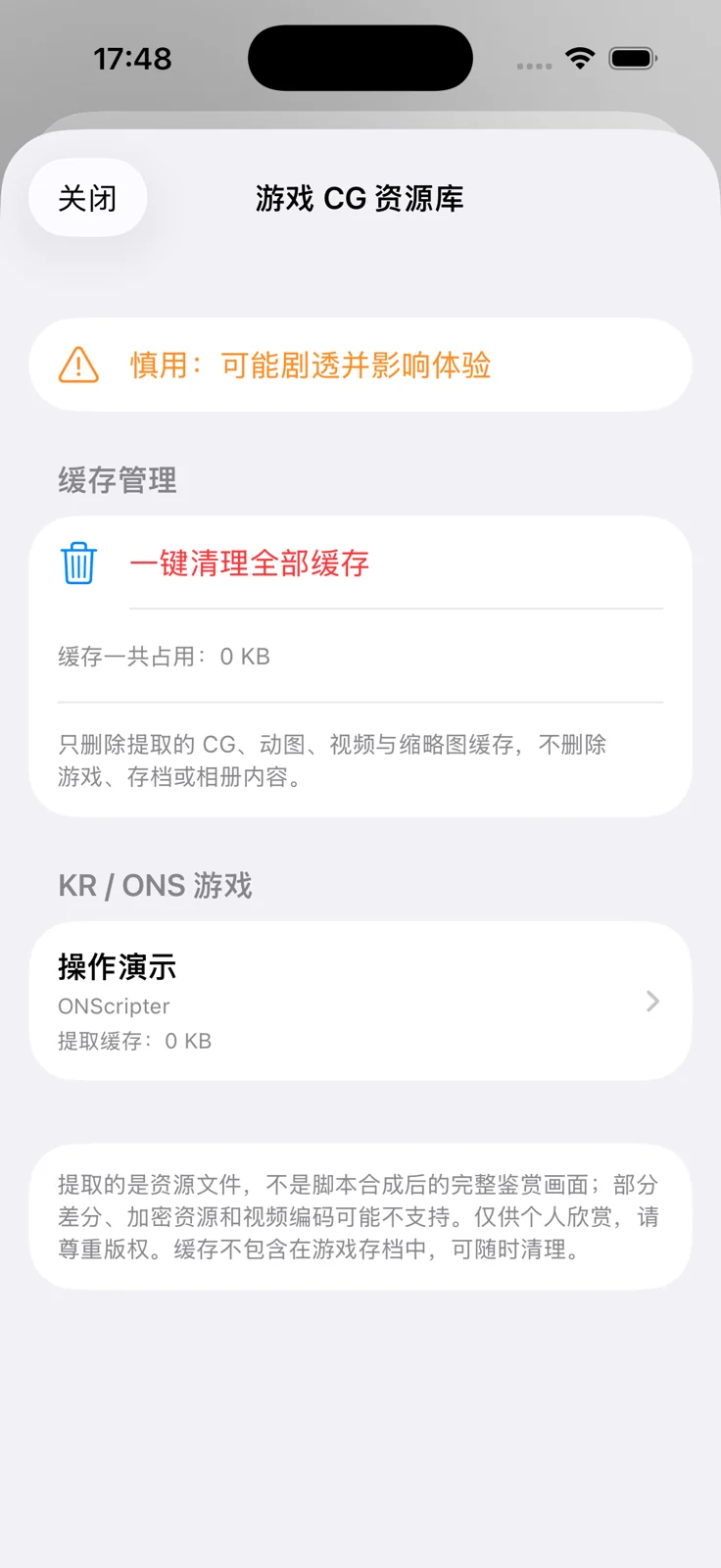
提取资源 · 可能剧透Extract resources · spoilers possible
「设置 → 提取游戏 CG 资源库」,阅读提示后选择一部 KR 或 ONS 作品,点「提取此游戏资源」。可按尺寸或文件名排序,切换静态图、动图 / 视频,点缩略图查看。Ren’Py 暂不在此资源库范围内。Open Settings → Extract Game CG Resources, acknowledge the spoiler notice, select a KR or ONS title, and tap Extract This Game’s Resources. Sort by size or filename, switch between images and animation/video, and tap a thumbnail to preview. Ren’Py is not currently supported here.
保存到相册Save to Photos
在预览页点「保存到相册」,按系统提示允许添加照片。资源只用于你有权进行的个人使用;提取结果不是脚本合成后的完整鉴赏画面,部分加密、差分或视频格式可能无法预览。Tap Save to Photos in the preview and allow adding photos when prompted. Use resources only as permitted by your rights. Extracted files are not necessarily fully composed in-game scenes; some encryption, layered artwork, or video formats may not preview.
优先清理可重新生成的缓存Clear rebuildable caches first
资源库的「一键清理全部缓存」或单作品「清理缓存」只删除提取的资源和缩略图缓存,不删除游戏、存档或已保存的相册内容。若要删除旧备份或原始压缩包,先确认已有外部副本与可用游戏。Clear All Caches or a title’s Clear Cache removes extracted resources and thumbnails, leaving games, saves, and Photos items intact. Before deleting old backups or source archives, confirm you have external copies and a working import.
遇到问题,从这里查Troubleshooting
Q1压缩包导入失败或密码不对Import fails or the password is rejected
Q2APK 能导入,却打不开An APK imports but will not run
Q3游戏库没有出现新卡片No new card after import
Q4黑屏、白屏、卡住或立即退出Black/white screen, freeze, or immediate exit
Q5文字乱码、缺字或方框Garbled text, missing glyphs, or boxes
Q6没有声音或视频不能播放No sound or video playback
Q7存档读到下一句或分支不一致A save resumes on the next line or wrong choice
Q8退出后旧画面回来,或 Ren’Py 不能再次启动Old frame after exit, or Ren’Py will not restart
Q9恢复完成但进度没变Restore finished but progress is unchanged
Q10会上传我的游戏或记录吗Are my games or history uploaded
Q11支持什么设备和内容Which devices and content are supported
还没解决?Still stuck?
描述问题发生在哪一步,比只说“打不开”更有帮助。请使用下面的清单联系支持。Tell us which step fails and what happens. Include the following details when contacting support.